Setting up a fund
A fund is ready to take money when six things exist, and they build on each other in order: the vehicle, its classes, its books, its posting behavior, its calendar, and its fee terms. Skipping ahead does not fail loudly; it produces a fund whose first posting has nowhere correct to land.
1. The vehicle
Fund setup (New fund on the Funds list) is the one place a fund is created: it makes the fund, its first share class and its first capital account together, and fixes the decisions that everything downstream reads: base currency and the funding model (open-end subscriptions or closed-end commitments). Together with the fund's equalization method - including series accounting for funds that issue a new cohort each dealing date - these are structural choices, not preferences; changing them after activity exists is a conversion, not an edit.
2. Share classes
Share classes carry what differs by investor population: currency denomination, fee terms, eligibility. They are added and edited on the fund's Setup tab; Share Classes lists every fund's classes side by side. Two investors in different classes of the same fund share one portfolio and one ledger; the classes decide how its economics reach them.
How many decimals units and prices carry is set once for the workspace on Settings › Accounting Setup › Unit Precision, and can be overridden per fund and per class. That page also shows what any class resolves to through the three tiers.
3. The books
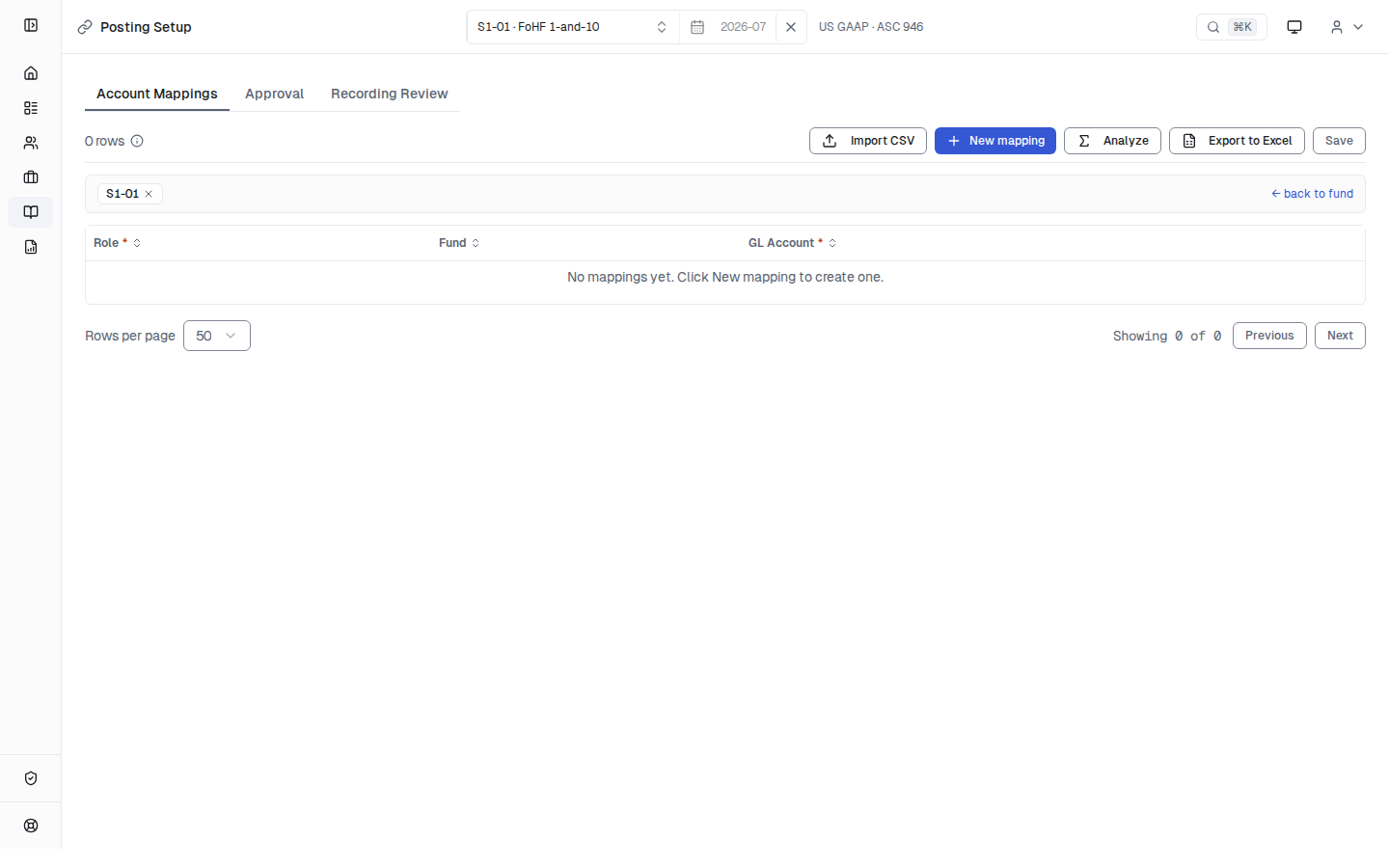
A fund's Chart of Accounts can be seeded from the standard template and extended. The ledger never guesses where a posting belongs: the Account mappings tab of Posting setup binds each accounting ROLE the engines use (contributed capital, fee payable, cash, income) to a concrete GL account. A role without a mapping is the most common cause of a first-posting failure, and the error names the missing role.
4. Posting behavior
The templates that turn activity into journal entries - which sides, which roles, which dimensions - are the posting rules, a registry shared by every workspace on the deployment and maintained from the platform console's Posting rules section. Every fund posts through the same audited defaults, which cover the standard cases; funds with unusual treatments ask the platform operator for the change rather than hand-booking entries. The workspace's own lever stays the mappings: which concrete accounts the shared roles land in is each fund's business.
5. The calendar
Fiscal Calendars give the fund its periods. Periods are the unit of close, of allocation, and of editability: transactions are editable while their period is open and sealed once it closes. A fund converting from another platform sets its conversion date here and opens with a balance snapshot rather than replayed history.
6. Fee terms
A fund's Fee terms tab (on the fund hub) is where you state the economics (rates, hurdles, high-water marks, crystallization schedules) in LPA language; it derives the underlying structures and account assignments for you from the Library tab of the tenant's Fee terms page. The fee chapter covers the full pipeline; at setup time the essential move is stating terms so accruals exist from the first period, because retrofitting fees into closed periods is a restatement.
Blocker corporations
In Fund Setup, choose the Blocker corporation entry card. It supports one or more investors behind one corporation; no sole external owner is required. Enter federal and state rates as percentages, including an explicit zero when applicable, and choose whether to accrue deferred tax on unrealized gains. Rates are additive; no statutory rate is assumed. Open each investor’s capital account through their first subscription or commitment. Link the blocker to its underlying fund or AIV as a fund-as-investor holding in Structure.
The blocker's Setup → Fund Record → Blocker Corporate Tax panel lets you edit rates, elect deferred tax on unrealized gains, and post an accrual for a selected period. Allocate the underlying fund first. Running the blocker's allocation also accrues tax automatically, then allocates its net results to its investors. The underlying fund's capital account remains gross. Investor statements show the gross P&L components and a separate Blocker tax deduction.
Current tax uses allocated book income and realized gains, net of expenses and fees. Unrealized movements receive deferred tax only when elected. The cumulative temporary difference sets the deferred balance at the configured rate; each period posts the change from the prior reserve, so reversals release the actual amount accrued even after a rate change. Current losses receive no carry benefit. Loss carryforwards are not recognized, including deferred tax assets for those losses. Foreign holdings use the same period-end FX source as the ownership pickup. Tax return preparation and statutory book-tax adjustments are outside this calculation.
The panel separates the selected period's current and deferred accruals from all-period tax payable and deferred balances. Entries post to the blocker's income tax expense, income tax payable and deferred tax liability accounts. They are ordinary ledger entries visible on its books. Changing rates does not rewrite posted history: rerun affected open-period blocker allocations to reverse and repost the changed tax. Closed periods retain the normal posting guards.
Then: the first dollar
With the six in place, post an opening subscription on Investor Activity and run the period. The close guards will tell you what was missed - that is what they are for.